🕑 Reading time: 9 min.
Besides creating ads and texts for your social media posts, you will also need creatives. If you are not a professional photographer or a graphic designer, creating these can be a daunting task.
With the continued development of AI, there are now tools that create and edit images for you according to your wishes. We have browsed the internet, tested many, and found the best. Some are standalone tools, while others are integrated into a bigger app.
To show you comparable results, we gave all generators the same prompt: [Create] “a luxurious villa in Bali which is sitting on top of rice terraces with a beautiful view into the distance, sunset mood, hyper-realistic photography, golden hour 8K 3D”. Here are the results of the 10 best AI tools.
What awaits you
Nightcafe
Nightcafe is a text-to-image app that turns the ideas in your head into high-quality visuals. Whether it’s a random and vague thought or a highly specific vision, the AI image generator can transform almost anything you can think of into an image or a work of art.

To create images, open Nightcafe’s image generator and describe what you want your image to look like. You can let Nightcafe run with your description and create an image for you. However, you can also choose to use Nightcafe’s advanced prompt editor to improve your prompt.


Recently, Nightcafe has updated its user-interface to improve the user-experience and facilitate the image generation process.

Choose an artist, an image, or color style and add other keywords such as “8K resolution” or “pencil sketch”, to personalize your image. When you’re finished, click “Done” and “Create” and Nightcafe will create the images for you.
However, the results we got from Nightcafe were not among the best of the tools we tested and would rank the quality of the images created in the bottom third of the AI image creation tools in this list.

Once you feel comfortable with how Nightcafe works, you can dive deeper into its settings and test other algorithms and models that Nightcafe offers, including the popular Stable Diffusion model and the DALL-E 2 model.
Nightcafe also offers an AI text-to-video creator which you can use for your social media content creation.
Advantages:
- Good user interface with many helpers and functions that help to better describe your vision.
- Free credits that are recharged every day.
- Multiple, different AI image generator models, including the latest version of Stable Diffusion and DALL-E 2 usable.
- Insight into all the images you’ve created in the past.
Disadvantages:
- The quality of the generated images ranks only in the lower third of all the tools we tested.
- It generates only one image per prompt by default. If you want more images per prompt, it costs more credits.
- No further adjustments are possible once the image is created.
- Images look too little photo-realistic and too stylized.
Price:
- Limited free credits that are renewed every day.
- Additional credits can be purchased. There are two pricing models: a subscription model and a one-time payment model. Prices range from $7.99 for 100 credits to $299.99 for 10,000 credits. In the subscription model, there are four options ranging from $5.99 for 100 credits to $49.99 for 1,400 credits.
Dream.ai by Wombo
Dream can be another useful text-to-image AI for your social media strategy. Dream offers both an app and a web version. Just like in Nightcafe, you type in a text of what you want to see, choose an image style, such as Cartoon, HDR, Realistic, or Line-art, and then Dream will create the image for you. You can also specify an image ratio, such as 9:16 or 4:3.
Dream.ai makes it easy to create the images you want because of its easy-to-use interface. The results we created with Dream have been fantastic, which was not the case for every app we tested.

Another cool thing about Dream is that you can edit your own images. Just upload an image from your device and tell Dream what you want to change in the image. For instance, if you want to add a mountain in the background of the picture or delete a trash bin in the background, that’s not a problem. You simply need to use Dream’s image editor.


Importantly, dream offers a free version. However, if you want to receive more than one suggestion on a single prompt, make variations, or use all the image styles that Dream offers, then you can opt for a premium account which is $9.99 /month or $107.99 /year.
Advantages:
- Creates great images.
- There is a web version as well as a dedicated app.
- Large selection of image styles.
- You can upload your own image to give it to Dream as a reference for your desired image style.
- Simple user interface.
Disadvantages:
- In the free version, most image styles are not available.
- In the free version, only 1 image is created per prompt and, once images are created, changes, are not possible.
- Limited wizards to help you describe your visions.
Price:
- Limited free features.
- Premium features can be purchased. Full access costs $9.99 per month or $89.99 per year. Alternatively, you can purchase lifetime premium access by making a one-time payment of $169.99.
Bing Image Creator
Microsoft also joined the text-to-image scene with its Bing Image Creator. Image Creator provides a comprehensive AI suite for free that you can use for your content marketing. You can use Bing Image Creator in the Bing app or on the website.

To generate AI images, simply enter a text prompt and press “Create”. Image Creator works similarly to the other tools on this list—you just enter the prompt and hit “Create” to generate images. The results in our test were impressive, and you can produce more specific pieces of art by describing your images as detailed as possible. Image Creator produces four images of different styles for every prompt of yours. You can download them for free and use them for your social media posts.
Bing Text-to-image - 1

Creation 1 of the prompt: "A luxurious Bali villa framed by rice terraces with magnificent distant views, sunset mood, hyper-realistic photography, Golden Hour 8K 3D" by Bing Image Creator.
As of right now, you cannot get more variations on your images, and it is not possible to choose an aspect ratio other than 1:1 (square format). That means, that if you like one of the four suggestions that Bing offers, but would like to change one or two things in this image, you won’t be able to do that. Instead, you will have to edit your prompt text based on the results you receive the first time.
We recommend that you try adding or removing things you liked or disliked in the suggestions you received the first time to make your prompt more specific and align more with what you are looking for. Then try again.
Advantages:
- Beautiful looking images
- Easy to use
- Available as an app or on the web
- Completely free
Disadvantages:
- There are no prompt helpers besides the input line
- No option to make variations or changes to images once created
- There is a watermark in the image
- Images only in 1:1 format (square)
Price:
- Bing Image Creator is completely free
Midjourney
Midjourney has emerged as a prominent AI text-to-image algorithm that has garnered significant attention online. It runs on Discord and creates a wide range of images from abstract to ultra-realistic as well as from simple patterns to highly detailed scenes. It can be a good addition to your social media marketing.
However, there is no longer a free trial of Midjourney, so you have to pay from your first prompt. Prices start at $10 /month. However, you can look into all the images that Midjourney has already created for other customers to see if it is a good fit for you.

In order to let Midjourney create images for you, go to Discord and then search for the Midjourney channel. Go into one of the “newbie”-channels and type in the “/imagine” command. Now type in what you want to see, such as objects, colors, or artistic styles.
Midjourney will produce 4 images of different styles for your prompt. The impressive thing is that Midjourney can create variations of each image it creates (via the buttons U1 to U4 or V1 to V4). So, after being presented with the first four images, choose the one that resembles your imagination best and let the AI come up with more variations of this image to get closer to your vision step by step.

Even though there are almost no wizards available that facilitate the use of Midjourney for a new user, you can complement your prompts with special commands manually in order to get the most out of the tool. For example, when producing photo-realistic and high-quality images, you can add “–q 2” and “–style raw” at the end of your prompt (e.g. “Ultra-realistic picture of a friend group, making a group selfie and drinking a Tequila sunrise at the beach –style raw –q2”). This ramps up the image quality to the highest level and creates a more realistic-looking image. To see a list of parameters you can add to your prompt to make it fit your imagination best, Google “Midjourney parameter list”, or visit this website or video.
Midjourney also offers the option to use a starter image that resembles the image style or type of content you are looking for. For instance, you can use the “/blend” prompt which lets you upload two to five images of your own and blend them together. We are also fond of the “–no” command, which lets you specify those things you do not want to see in an image.
Two things Midjourney struggles with, however, are server availability and user-friendliness. Because they receive several requests, Midjourney needs to restrict server availability during peak hours.
Compared to other tools, you can also feel quite lost when you first use Midjourney and there are no templates to use. Nonetheless, the outstanding images Midjourney created still rank it among the Top 3 image creation tools we tested. The results were truly impressive, and it can help you a lot in your content creation for social media.
Advantages:
- Outstanding results.
- Variations of once created images possible, allowing you to further customize the AI’s suggestions to your liking.
- Possibility to provide a starting image.
Disadvantages:
- The tool is cumbersome for new users to find, as they first have to log in to a third-party service (Discord), then find Midjourney’s channel, and finally read the documentation before understanding how to create images.
- There is no longer a free version available.
- There are hardly any wizards that make it easier to use. Instead, you need to add rather cryptic parameters to the end of your prompt to change the quality of the image.
- Server accessibility sometimes poor.
Price:
- Prices range from $10 to $120 per month, or from $96 to $1,152 per year.
- Midjourney’s pricing model is not based on the number of images you create, but rather the number of hours you use Midjourney’s computing power.
You Imagine
“You” is a provider of numerous AI helpers. The “Imagine” tool by “You” is so far only available via the website and not yet as an app. It creates images based on your text input. “You Imagine” uses the popular “Stable Diffusion” framework by default to create images. But you can also switch to other frameworks, such as the “Open Journey” or the “Anime” model.

The quality of the generated images is good, and the user interface is better than the web page of Stable Diffusion itself. You Imagine creates four images per prompt. You can download all four images for free and without watermarks. However, the resolution of the created images is only 512 x 512 pixels.


“You Imagine” offers 10 free prompts. After you have used them up, you can subscribe to the Pro plan, which costs $10 per month and gives you unlimited access to all of You’s AI helpers.
One thing to mention is that “You” also offers a tool that enhances the resolution of your low-quality images. By accessing the “You Imagine” website and scrolling down, you can access the “Image Enhancer”. Just upload your own images and “You” will enhance the quality of your image.
Advantages:
- Three different AI image generator models usable, including Stable Diffusion XL.
- It has a clear structure, as even new users can quickly understand how the tool works.
- Creates four images per prompt, which you can download for free without a watermark.
- There’s also an AI tool that improves the resolution of low-quality images.
Disadvantages:
- The resolution of the created images is low.
- There are only a few wizards that help to better describe your visions.
- Only square images are created by default.
- No possibility to further customize created creations.
Price:
- 10 free prompts
- The price of a subscription to You is $9.99 per month. This gives you unlimited access to You Imagine. In addition, you can use all of You’s other services, such as the AI chatbot, the search engine YouChat, and the AI writing tool You Write, in full as well.
StarryAI
StarryAI is an innovative AI image generator app that aims to simplify the process of generating artworks from text prompts. StarryAI provides a user-friendly interface that makes art generation accessible to a wide audience.
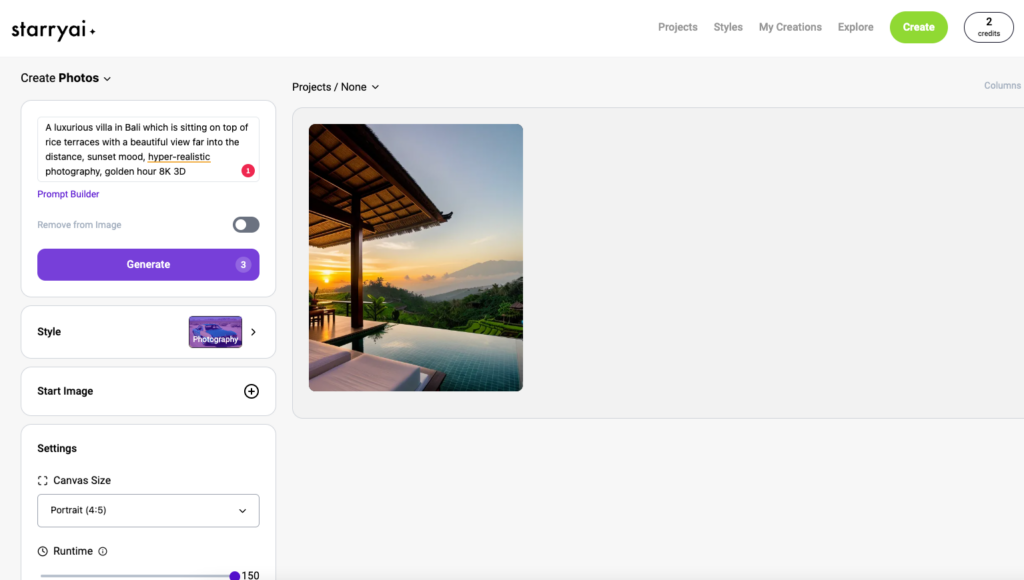
Unlike many others, Starry AI offers granular control over certain aspects of the image creation process that make the results a lot more personal. Start by selecting the AI image type: Art or Photo. Now enter your prompt, choose an art/photo style, Canvas Size, and Runtime, and optionally add your own starting image to use as a baseline.


The helpful feature of StarryAI is that you can refine the results and shape them according to your liking. The downside is that each iteration will cost you credits. Once your 5 free credits are gone, you will have to either pay to create more images (monthly payment or credit-based payment possible) or earn free credits every day or week by watching ads or sharing your creations on social media. Prices for premium access start at €8.99 (40 credits).


The results we got were good, even if they were not as realistic as we might have wished. StarryAI also included a woman in the image, which we hadn’t mentioned at all in our prompt. When it comes to creating people, StarryAI shows weaknesses.
Advantages:
- The image generator can be used via the website as well as via an app.
- There are many useful wizards (regarding image format, etc.), as well as a “prompt builder” that helps to describe your vision better.
- The images generated by the AI can be further customized.
- You receive four images for every prompt.
- You can specify a starting image.
Disadvantages:
- Problems with the creation of faces.
- There are problems with weighting the different parts of the user input: The mansion, which should be the center of the image in our test, fades too much into the background.
- The free credits are used up quickly.
- Quality of the images in the lower midfield of our test.
Price:
- 5 free credits that are renewed daily
- Additional credits can be purchased. There are two pricing models: a subscription model and a one-time payment model. In the latter, prices range from $15.99 for 40 credits to $149.99 for 1,000 credits. In the subscription model, there are three options ranging from $8.99 for 200 creations per month to $63.99 for 8,000 fast generations per month plus unlimited slow ones.
WePik
WePik is a platform that lets you design Instagram stories, as well as flyers and brochures. The AI text-to-image editor is an easy-to-use tool for creating AI images that turns your ideas into stunning graphics in seconds.

The WePik text-to-image tool can be accessed through the app and as well as WePik’s website. It offers a wide variety of styles and personalization options. For instance, you can choose an aspect ratio (portrait, square, landscape), an image style (Photo, 3D, Vintage, Comic, Painting, Cyberpunk), the lightning (Studio, Cinematic, …), and a framing (Portrait, Aerial View, Close-Up, Panoramic, etc.). Moreover, when it comes to photo frames, WePik stands out and offers many great features in an appealing wizard.

WePik offers extensive help to new users. For each prompt, WePik generates four images. The results we obtained were among the better ones in our test.


If you are looking for good usability, want to generate images of people, and value quality, WePik could be your tool.
Advantages:
- The image generator can be used via the website as well as via an app.
- There are some useful wizards (regarding image format, perspective, etc.) that help to choose an image style.
- Very good quality images.
- Easy to use.
- Four images are generated per prompt.
- WePik offers an online image editing tool in addition to the text-to-image tool, which can be used to further edit the creations.
Disadvantages:
- Few free prompts.
- No “prompt builder” available to help you write better prompts.
- No further customization of the created images possible.
Price:
- You get 36 credits for free, with which you can test 9 prompts of four images each. After that, you can decide to purchase more credits with which you can create more images.
- There are three paid packages, all of which are credit-based. You can buy 100 credits (= 25 prompts), 500 credits (= 125 prompts) or 1,000 credits (= 250 prompts) for €4.99, €9.99 and €14.99 respectively.
Picsart
Picsart is a complete image editing platform which is specifically designed for social media content creators. The app offers many goodies for content creators, such as ready-to-use image sizes for the major social platforms. The AI image generator eliminates the need for extensive artistic skills or technical expertise, and you can use it with your free account.
To access the AI image generator, open the Picsart editor in the app or on the website and then go to “Photos”.

The great thing about Picsart is that it is free and easy to use. Furthermore, you don’t need more than a well-crafted prompt to get new ideas for your pictures.
Picsart offers help in creating the prompt by letting you specify the mood, art or style, quality, and colors of your image.
Other AI helpers help you get the most out of your ideas. “AI Optimization” lets you improve the resolution of your blurry images. The “AI Style Transfer” allows you to upload your own image in order to introduce the AI to an image style you really like. The AI will then imitate this style in its updated images.
The results are generated quickly. Compared to most other tools, you can not only download the generated images, but also edit them as you would in tools such as Photoshop or Canva by positioning them on a white canvas with other design elements.
Picsart Text-to-image - 1

Creations 1-4 of the prompt: "A luxurious Bali villa framed by rice terraces with magnificent distant views, sunset mood, hyper-realistic photography, Golden Hour 8K 3D" by Picsart.
The results are good, although somewhat stylized and less photorealistic than the images generated by other tools. Premium access is available from €10 /month or €45 /year. You can use Picsart to create social media content, advertisements, and other branded designs.
Advantages:
- Easy to use
- There is a completely free version
- Picsart offers many more image editing options, especially for creating social media content
- Prompt writing helpers make it easy to create a good prompt. They help you find the right mood, art or style direction, quality and colors
- Other AI helpers assist you in getting the most out of your ideas
Disadvantages:
- The quality of the images created by the AI is mid-range at best
- The AI can’t further customize the created images to the user’s preferences and make changes
Pricing:
- Picsart offers a 100% free option
- Premium access is available from €10 / month or €45 / year
Canva Text To Image
Canva is one of the most popular photo-editing and designing apps on the market. Recently, Canva has added a free AI text-to-image creator with which you can create social media posts, ad campaigns, and branded designs.

To access the AI image generator, open a project and use the Canva Assistant in the bottom-right hand corner. Type in “text to image” and select the last item on the list of results to open the image creator. Now simply type in what you want to have an image of, and let Canva create four images for you. You can choose between many image styles and three aspect ratios.
The AI image generator eliminates the need for extensive artistic skills or technical expertise, is very easy to use, and you can integrate your generated images in any of your creative projects on Canva.
The results Canva produces are more than decent, although they appear a bit too stylized and cannot match the best in this test.
Canva Text-to-image - 10-13

Creations 10-13 of the prompt: "A luxurious Bali villa framed by rice terraces with magnificent distant views, sunset mood, hyper-realistic photography, Golden Hour 8K 3D" by Canva.
With its AI image generator, Canva gives you yet another option of visualizing your ideas and creating appealing visuals. Canva’s image library is already huge, however if you are looking for something very specific or unique, try out the new text-to-image tool, which is available for both free and paying users.
Advantages:
- The text-to-image tool is available completely free to both paying customers of Canva, as well as non-paying users.
- Canva offers many other image editing options, especially for creating social media content.
- More image editing options are available in Canva. These allow you not only to download the generated images, but you can also use them as elements to embed in your other designs.
- Four images are generated for each prompt. There is no limit to the amount of images you can create.
Disadvantages:
- The text-to-image tool is not easy to find in Canva.
- Hardly any wizards to help you write better prompts or set perspective.
- Image quality was one of the worst in our test.
- AI can’t further adjust images once created
Pricing:
- Canva offers a 100% free option, which also includes the text-to-image generator.
- Pro access to Canva is available from € 11.99 /month or € 109.99 /year per person.
Adobe Firefly / Photoshop Beta AI Generative Fill
The last AI on our list is Adobe’s Firefly.

After accessing Adobe’s website and logging into your Adobe account, you can create images in your web browser by opening the text-to-image tool, typing in a prompt, and further specifying an aspect ratio, content type, themes, color schemes, lighting, as well as an image angle.
The results look good overall, and the image generation tool is free to use without any limits. However, the images all receive an author credit.


There is no possibility of getting more variations of one of the images that Firefly created, and the four images Firefly ultimately produced for us do not vary all that much and look more or less the same. That means you will either love all of them, or none.


Besides the image generator, Adobe’s Firefly also offers advanced image editor tools. For example, their recoloring tool or their Generative Fill tool lets you edit existing images.
If you have been using Adobe Photoshop regularly and want to continue to do so in the future, then you can also download “Photoshop Beta” which is free for Photoshop CC clients. This gives you the opportunity to use the AI-powered “Generative Fill” tool within Photoshop itself. This tool can save photographers and designers hours of time and is relatively easy to use.
Generative Filling helps you edit certain aspects of your image. You can remove, recolor, or resize things you like to change in your image, and even add things which are not yet there but which you want your picture to contain. Although still in Beta mode, the AI tool already works very well.
If you have been using Photoshop for a long time and need all the advanced image editing tools, you should give Photoshop Beta and its new “Generative Filling” option a try.
Advantages:
- Impressive quality of images.
- Free to use with an Adobe account and no restrictions.
- There are a few helpers to specify the image format or style.
- You get 4 images per prompt.
- Firefly interprets and prioritizes the keywords in the user input very well. In our example, the villa was the focus of the image and should be framed by rice terraces. Firefly implemented this to perfection.
Disadvantages:
- There are no prompt-writing helpers to help ensure your prompts are more understandable to the AI, and no wizard to set the image perspective.
- All images are clearly watermarked by Adobe.
- There is hardly any variation in the four images.
- The tool is only available in English and texts must also be entered in English.
- No further adjustments possible to the images once created.
Pricing:
- Adobe’s text-to-image tool is completely free of charge.
- Photoshop Beta requires an Adobe CC subscription, but is available to Adobe CC subscribers at no extra charge.
Conclusion
The 10 tools presented here currently set the standards in AI image creation. Some providers have standalone text-to-image software and others integrate it into an existing tool. Overall, AI text-to-image tools vary widely in creation time, prices, user experience, and quality. Midjourney, Adobe Firefly and Bing showed the highest quality results in our test. However, no tool is perfect, and the individual weight you assign to the different factors will strongly influence your own preferences for one tool or another.
However, one thing is certain: you no longer need to be a designer or photographer to create appealing visuals. The text-to-image tools mentioned in this article make it easier than ever to create stellar images for your social media content.